 Ziduri

Marker: a very lightweight, beautiful markdown viewer and editor
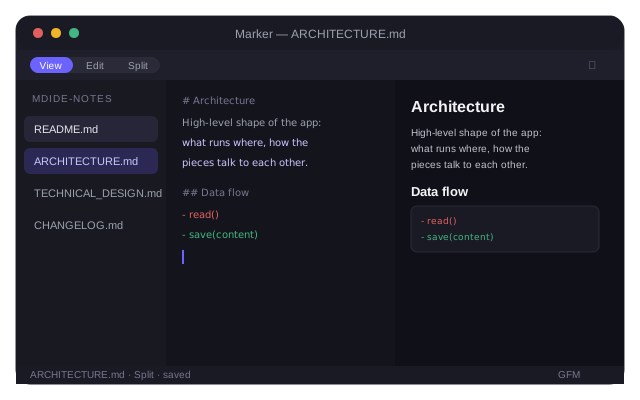
A desktop app (via Tauri) for Windows, macOS and Linux, with an optional browser mode. View, Edit and Split modes, GitHub-flavored markdown, syntax highlighting — and no accounts, no telemetry, no network requests at all.
Free and open source under the MIT license. Source code on GitHub.
Reading and editing markdown shouldn't need a whole IDE
Opening a README or a notes file often means either a plain-text editor with no preview, or firing up a full code editor for a one-line edit. Marker is purpose-built for exactly one job: open a markdown file or folder, read it rendered, edit it when you need to, and save it back — nothing else running, nothing phoning home.
What Marker does
View, Edit and Split modes
Toggle View/Edit per file with Ctrl/Cmd+E, or open Split to see the rendered preview and source side by side.
Single file or a whole folder
Open one .md file, or browse a folder to see all its top-level markdown files in the sidebar.
Save in place
Ctrl/Cmd+S writes back to the original file, with an unsaved-changes prompt before you switch files or close.
GitHub-flavored markdown
Tables, task lists and fenced code blocks render with syntax highlighting, powered by marked and highlight.js.
Light and dark theme
Matches your preference, with a manual toggle in the toolbar.
One codebase, two hosts
The same interface runs as a native Tauri app or entirely in the browser — no server, no build differences to worry about.
Who Marker is for
Developers
Read a repo's README and docs rendered, or make a quick edit, without opening a full code editor.
Note-takers
Keep plain-text notes in markdown and get a clean, distraction-free reading and editing view.
Anyone without a code editor handy
Open the browser version at markdw.netlify.app to view or edit a markdown file with nothing to install.
Usage
Open a file or a folder from the sidebar, then switch between View, Edit and Split as you go.
| Shortcut | Action |
|---|---|
Ctrl/Cmd+E | Toggle View / Edit mode |
Ctrl/Cmd+S | Save the current file in place |
| Open File… | Open a single markdown file |
| Open Folder… | Browse a folder's top-level .md files in the sidebar |
Install Marker
Download the installer for your OS from the latest release, or skip installing entirely and use the browser version.
Windows
Run Marker_<version>_x64-setup.exe (or the .msi — either works). The build is unsigned, so SmartScreen will show an "unrecognized publisher" prompt on first run: click More info, then Run anyway.
macOS
Download the .dmg for your chip — _aarch64.dmg for Apple Silicon, _x64.dmg for Intel. The app is unsigned, so Gatekeeper blocks the first launch: right-click the app and choose Open once.
Linux
Use the .deb on Debian/Ubuntu, the .rpm on Fedora/RHEL, or the .AppImage on any distro.
Browser (no install)
Open markdw.netlify.app. In Chrome or Edge you get full folder browsing and save-in-place via the File System Access API; other browsers get single-file open/edit with save as a download.
Each release also includes a .app.tar.gz per macOS architecture — those are auto-update artifacts, not meant for manual download.
What Marker accesses, and why
As a local editor, Marker doesn't request browser-style permissions on desktop — it reads and writes only the files and folders you point it at through native OS dialogs. See the privacy policy for the full picture.
| Capability | Why it's needed |
|---|---|
| Filesystem (desktop) | Reads and writes the markdown file(s) you explicitly open via the native Open File / Open Folder dialogs. Marker never scans your disk on its own. |
| OS dialogs | Native file and folder pickers, and a native "unsaved changes" confirmation prompt. |
| File System Access API (browser) | In Chromium browsers, grants the same folder-browsing and save-in-place access, scoped by the browser's own per-site, user-gesture-gated permission prompts. |
| Network | None. Marker has no HTTP client and makes no network requests — every render happens against content already in memory. |
Frequently asked questions
Does Marker send my files anywhere?
No. Marker makes no network requests on desktop or in the browser. Files you open are read and written locally — through native OS dialogs on desktop, or the File System Access API in Chromium browsers — and never leave your device.
Why does the installer warn me it's from an unrecognized publisher?
Marker's builds aren't code-signed. On Windows, SmartScreen shows an "unrecognized publisher" prompt — click More info, then Run anyway. On macOS, Gatekeeper blocks the first launch — right-click the app and choose Open once to bypass it.
What's the difference between the desktop app and the browser version?
Both run the same interface. The desktop app (Tauri) reads and writes files directly through native OS dialogs. In a Chromium browser, the File System Access API gives the same folder-browsing and save-in-place experience; other browsers can still open and edit a single file, but save as a new download instead of saving in place.
Can Marker open a whole folder of markdown files?
Yes. Opening a folder lists its top-level .md files in the sidebar so you can switch between them. It doesn't recurse into subfolders.
Is Marker free and open source?
Yes. Marker is released under the MIT license and the full source is available on GitHub.
More resources
Documentation, release notes, privacy details and the source code.
More from Ziduri
 Browser Extension
Float Note
A translucent floating note editor that saves notes per page, right in your browser.
 Desktop Application
LiteView
A ~2 MB image viewer that opens SVG, WebP and AVIF natively — formats the stock viewer can't.
 Web App
Ephemera
Create a short-lived room and exchange text and images in real time. No accounts, no history.
 Web App
Anon Postal
Publish a public post with no account, or sign in for a private workspace with a custom expiry.