 Ziduri
 Available now
Anon Postal: share anonymously, save privately, expire automatically
A lightweight home for quick notes, public stories, and private workspace posts. Publish a public post in seconds with no account, or sign in with Google to keep notes in a personal dashboard with a custom expiry window.
Anonymous posts always expire after 24 hours. See the FAQ below for exactly what's public, private, and permanent.
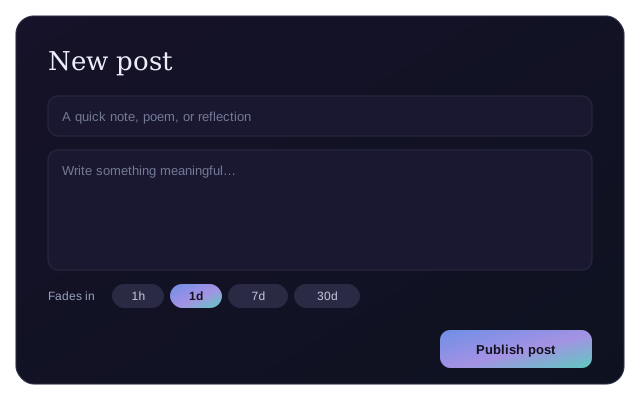
A quick note shouldn't require an account
Most places to jot down a thought and share it either demand a sign-up first or keep it forever whether you want that or not. Anon Postal separates the two concerns cleanly: publish anonymously and instantly for anything short-lived, or sign in only when you actually want a private, organized, longer-lived workspace.
What Anon Postal does
Anonymous publishing
Write a post and publish it publicly with no account — it gets a short-lived link and expires automatically after 24 hours.
Private workspace
Sign in with Google to keep posts — public or private — in a personal dashboard with editing and deletion.
Real expiry, not just a label
Signed-in users choose 1 hour, 1 day, 7 days, 30 days, or never; the choice becomes a fixed timestamp the app actually enforces.
Author identity stays hidden
Public posts never reveal who wrote them — not even to other signed-in users — only whether a post is yours.
Expired means gone
Expired posts disappear from listings immediately, and are permanently deleted from the database by a recurring cleanup job.
Light and dark themes
The interface follows your system theme, with a manual toggle available.
Who Anon Postal is for
A quick public note
Share a short story, thought, or announcement without creating an account, knowing it'll expire on its own.
A personal scratchpad
Sign in to keep private drafts and notes organized in one dashboard, with full control to edit or delete them.
Time-boxed sharing
Publish something you only want visible for a set window — an hour, a week, a month — without remembering to take it down.
From blank page to published post
Write
Open "Create a post," add a title and your words.
Choose visibility
Publish anonymously and publicly, or sign in with Google to also pick private and set a custom expiry.
Publish
Your post is live immediately at its own link.
It fades on schedule
At the expiry timestamp, the post disappears and is later purged from the database for good.
What Anon Postal accesses, and why
See the privacy policy for the full picture, including exactly what's stored when you sign in.
| Capability | Why it's used |
|---|---|
| Google sign-in (optional) | Authenticates you for the private workspace, using your Google account's basic profile (name, email, profile photo). |
| Database storage | Post titles, content, expiry timestamps, and public/private status are stored so posts can be served, listed, and expired correctly. |
| Scheduled cleanup | A recurring server job permanently deletes posts once their expiry timestamp has passed. |
| Anonymous posting | Requires no data from you beyond the post itself — no account, cookie identity, or profile is created. |
Frequently asked questions
Do I need an account to use Anon Postal?
Not for a public post — write one and publish it with no sign-in. An account (via Google) is only needed for private posts, choosing a custom expiry window, and editing or deleting a post later.
How long do anonymous posts last?
Always 24 hours. Anonymous posts are fixed to a 24-hour expiry regardless of any expiry option shown in the interface — only signed-in users can choose a different window.
Can other people tell who wrote a public post?
No. The identity of a post's author is never exposed by the app to other viewers, even for signed-in users' public posts — the app only ever reveals whether a post belongs to the current viewer, never who anyone else's posts belong to.
What happens when a post expires?
It stops appearing anywhere immediately, and is then permanently deleted from the database by a recurring cleanup job.
Can I delete an anonymous post before it expires?
No. An anonymous post isn't tied to any account, so there is nothing to authenticate a deletion request against. It will expire automatically within 24 hours.
More resources
Documentation, release notes and privacy details.
More from Ziduri
 Web App
Ephemera
Create a short-lived room and exchange end-to-end encrypted text and images in real time. No accounts, no history.
 Browser Extension
Float Note
A translucent floating note editor that saves notes per page, right in your browser.
 Desktop Application
MarkDW
A very lightweight markdown viewer and editor for desktop, with an optional browser mode.