 Ziduri

JevReader: read what matters, keep every word
A privacy-conscious PDF reader that finds valuable original passages, highlights them by meaning, and helps you focus without turning the document into a generated summary.
The current pilot supports text-based PDFs. Your file stays in the browser; only selected text needed for Jev analysis leaves it.
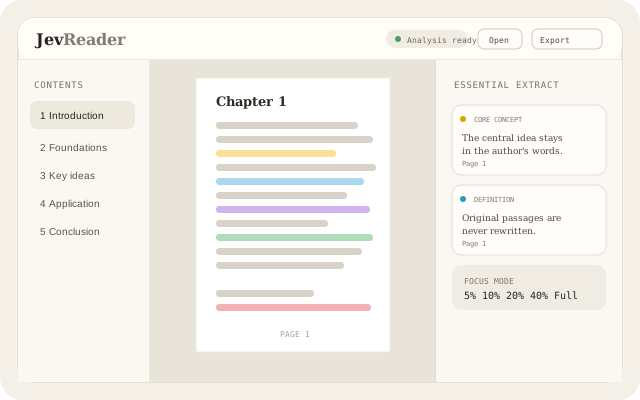
Long documents deserve better than a summary
A summary can be convenient, but it also replaces the author's wording with someone else's. JevReader keeps the document intact and compresses the reader's attention instead: it ranks original passages, maps them back to the PDF, and lets you choose how much to see.
What JevReader does
Open a PDF locally
Drop a text-based PDF into the browser or choose it from your device. PDF.js renders and parses it locally.
Read immediately
The first page opens while the document is still being parsed in a Web Worker, so analysis never blocks reading.
Objective-aware analysis
Choose learning, overview, interview, exam, practical, revision, research or a custom reading objective.
Semantic highlights
See core concepts, definitions, rules, constraints, practical insights, examples and conclusions in distinct highlight categories.
Focus modes
Switch locally between 5%, 10%, 20%, 40% and Full without sending another analysis request.
Essential Extract
Review a short set of high-value original sentences and jump back to each sentence's page.
Exact-text find
Find a phrase in the author's original text and jump straight to its page. Semantic Find is planned, but not part of the current pilot.
Export highlights
Create a new copy of the original PDF with the visible semantic highlights applied entirely in your browser.
Who JevReader is for
Technical books
Keep the central ideas and constraints visible while working through a long engineering or architecture book.
Research papers
Read the source itself, with relevant passages organized around the question you brought to the paper.
Reports and documentation
Find definitions, procedures and conclusions faster without losing the wording or context that supports them.
From PDF to focused reading
Open a document
Drop a text-based PDF into JevReader. The file is opened and rendered in your browser.
Set an intention
Tell JevReader whether you are learning, revising, preparing for an interview, researching, or pursuing another goal.
Read while it analyzes
Local parsing builds sections, paragraphs and sentence coordinates while Jev evaluates bounded batches of selected source text.
Choose your focus
Use semantic categories and 5%, 10%, 20%, 40% or Full Focus modes to control the reading view.
Export or return to source
Jump from an extract to its exact page, or download a locally highlighted copy of the original PDF.
What JevReader accesses, and why
JevReader is browser-heavy and server-light. See the privacy policy for the complete data flow.
| Capability | Why it's used |
|---|---|
| Local file access | Reads the PDF you explicitly choose so PDF.js can render it and extract text. The complete file stays in your browser. |
| IndexedDB | Caches the parsed document structure and completed analysis by document hash, objective and analysis version on this device. |
| Jev analysis API | Receives bounded batches of selected sentence IDs, source text and your reading objective so Jev can return structured judgements. The PDF and filename are not sent. |
| Web Workers | Parses document text and coordinates away from the UI thread so you can begin reading quickly. |
| Browser download | Creates the highlighted PDF copy locally when you choose Export; no document upload is needed. |
| Accounts and analytics | Not used by the current pilot. There is no sign-in, cloud document library or analytics SaaS. |
Frequently asked questions
Does JevReader summarize or rewrite my PDF?
No. JevReader ranks and highlights original sentences. Its Essential Extract is made from original passages, not generated prose.
Is my PDF uploaded?
The PDF itself stays in your browser. JevReader sends only bounded selected sentence text, IDs and your reading objective to the analysis endpoint, which forwards the selected text to Jev.
What kind of PDFs does JevReader support?
The current pilot supports text-based PDFs such as papers, reports, technical books and documentation. Scanned or image-only PDFs, password-protected PDFs, handwritten documents, EPUB and DOCX files are not supported yet.
What are Focus modes?
Focus modes show a locally selected share of analyzed passages: 5%, 10%, 20%, 40% or Full. Switching modes does not make another Jev request.
Can I export the highlighted document?
Yes. JevReader applies the visible semantic highlights to a copy of the original PDF in your browser and downloads it as a new PDF.
Do I need an account?
No account is required for the current pilot. The document, structure and analysis cache stay associated with your browser on this device.
More resources
Documentation, release notes and privacy details.
More from Ziduri
 Desktop Application
MarkDW
A lightweight markdown viewer and editor for reading and editing source documents.
 Desktop Application
LiteView
A tiny desktop image viewer for modern formats, with thumbnails and keyboard navigation.
 Web App
Ephemera
A short-lived room for exchanging end-to-end encrypted text and images.