 Ziduri
Float Note: a floating note editor that lives right on the page
A translucent, draggable note editor that opens on top of any webpage and remembers what you wrote — tied to the exact page you wrote it on. No accounts. No cloud sync. Nothing leaves your browser.
Free, published on the Chrome Web Store. Version 1.0.0.
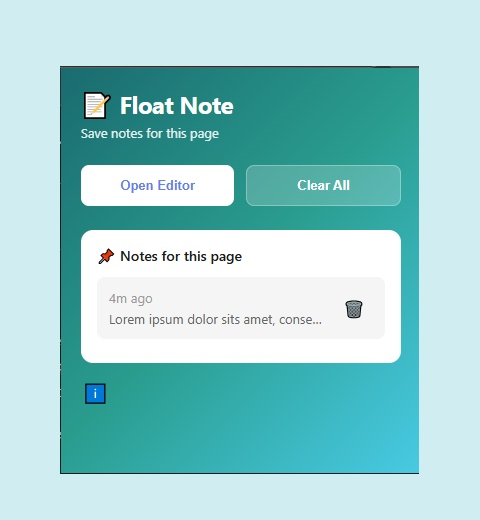
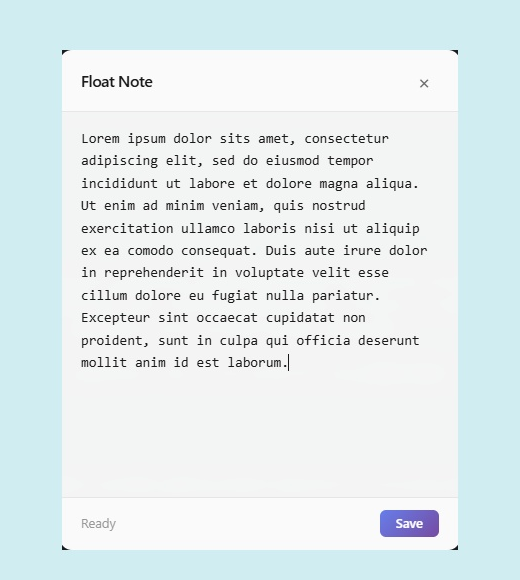
Screenshots from the Chrome Web Store listing.
Notes that actually stay with the page
Sticky-note apps and generic note-taking tools lose the connection between a thought and the page that triggered it. Float Note keeps that connection by design: open the editor on any page, and it's tied to that URL from the start.
What Float Note does
Floating, translucent editor
A draggable editor overlays the current page without navigating away from it.
Per-URL note storage
Each note is keyed to the page URL and the moment it was created, so you can find it again later.
Auto-save every 2 seconds
Changes save automatically as you type, with a manual Save option for immediate persistence.
Resume on return
Come back to the same URL — in the same tab or a new one — and your note is ready to continue.
Multiple notes per page
Create more than one note on a page; the popup lists every note tied to the current URL.
Local-only storage
Everything is saved with Chrome's built-in local storage. No account, no server, no network request.
Who Float Note is for
Research & reading
Jot down a thought while reading a long article or documentation page, without switching apps.
Reference while browsing
Keep quick working notes next to the page you're actively using, for as long as you need them.
Revisiting pages
Leave yourself context on a page you'll come back to, so it's there the next time you open it.
From click to saved note
Open the editor
Click the Float Note icon in your toolbar, then "Open Editor" on the current page.
Write
The editor appears with any previously saved content already loaded, ready to continue.
It saves itself
Your note auto-saves every 2 seconds, or click Save for an immediate write.
Come back anytime
Revisit the same URL later and reopen the icon — your note is exactly where you left it.
Install Float Note
Float Note is published on the Chrome Web Store — installing it takes one click.
Open the listing
Visit the Float Note page on the Chrome Web Store.
Add to Chrome
Click "Add to Chrome," then confirm in the permissions prompt.
Pin it
Click the puzzle-piece icon in your toolbar and pin Float Note so it's always one click away.
Start a note
Click the icon on any page and choose "Open Editor" to start writing.
What Float Note asks for, and why
Float Note requests the minimum permissions needed to run. Nothing here enables network access or data collection — see the privacy policy for the full picture.
| Permission | Why it's needed |
|---|---|
storage | Saves your notes locally using Chrome's storage API. |
tabs | Reads the current tab's URL so a note can be tied to the right page. |
scripting | Injects the floating editor interface into the page you're viewing. |
activeTab | Grants access to the current tab the moment you click the toolbar icon, so the editor still opens if you've limited site access to "on click". |
host_permissions: <all_urls> | Lets the editor open on any site, since notes can be created on any page you visit. |
Frequently asked questions
Where are my notes stored?
Locally on your device, using Chrome's chrome.storage.local API. Notes never leave your browser.
Does Float Note sync my notes across devices?
No. Float Note is local-only by design — it does not sync notes to the cloud or to other devices.
Does Float Note send any data over the network?
No. Float Note makes no network requests and includes no analytics or tracking.
What happens to my notes if I uninstall the extension?
Uninstalling Float Note deletes all notes stored by the extension, since they live in the extension's local storage.
Is Float Note available on the Chrome Web Store?
Yes. Float Note is published on the Chrome Web Store — search for "Float Note" or use the Add to Chrome button on this page.
More resources
Documentation, release notes and privacy details.
More from Ziduri
 Desktop Application
LiteView
A ~2 MB image viewer for Windows 10/11, Linux and macOS 13+ that opens SVG, WebP and AVIF through each platform's web engine.
 Web App
Ephemera
Create a short-lived room and exchange end-to-end encrypted text and images in real time. No accounts, no history.
 Web App
Anon Postal
Publish a public post with no account, or sign in for a private workspace with a custom expiry.
 Desktop Application
MarkDW
A very lightweight markdown viewer and editor for desktop, with an optional browser mode.