 Ziduri

LiteView: a tiny viewer for modern image formats
A ~2 MB image viewer for Windows 10/11, Linux and macOS 13+ with support for SVG, WebP and AVIF through each platform's web engine, plus PNG, JPEG, GIF, BMP and ICO. Linux requires WebKitGTK; no separate codec pack is bundled.
Free and open source under the MIT license. Source code on GitHub.
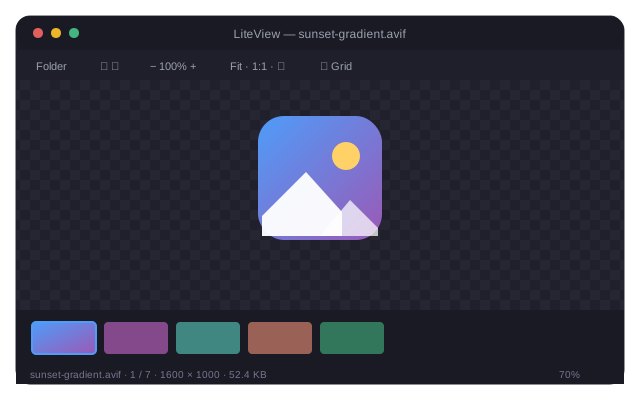
A small viewer for formats your default app may not support
Support for AVIF, WebP and SVG varies by operating system and installed components. LiteView uses the platform web engine — WebView2 on Windows, WebKitGTK on Linux, and WKWebView on macOS — to decode them. Windows 10/11 and macOS 13+ provide the required web runtime; Linux requires WebKitGTK 4.1 or a compatible package.
What LiteView does
Modern formats through the OS engine
SVG, WebP and AVIF decode through the OS webview engine. LiteView does not bundle a separate codec pack.
Actually lightweight
The whole app is about 2 MB. It cold-starts almost instantly and runs no background services.
Thumbnails everywhere
A filmstrip and a full grid view, lazy-loaded and prioritized for what's currently on screen.
A real viewer
Zoom at the cursor, pan, rotate, fit-to-window or 1:1, fullscreen, and a pixelated mode for inspecting pixel art past 300% zoom.
Keyboard-first
Arrow keys to move between images, G for grid, F for fullscreen, 0/1 for fit/actual size — everything reachable without the mouse.
Cross-platform
One codebase ships to Windows, Linux and macOS, packaged natively for each.
Who LiteView is for
Designers & developers
Quickly preview SVG assets and exported icons without opening a design tool or browser tab.
Photographers
Browse folders of modern AVIF/WebP exports with fast thumbnails and smooth zoom on large photos.
Anyone downloading modern web images
Open AVIF and WebP files saved from the web the moment double-clicking them stops working in Windows.
Usage
Launch LiteView from the app menu, or run liteview <image-or-folder> — opening one image loads its whole folder into the filmstrip.
| Key | Action |
|---|---|
← / → / Space | Previous / next image |
Home / End | First / last image |
| Mouse wheel | Zoom at cursor |
| Drag | Pan |
| Double-click | Toggle fit / 100% |
+ / - | Zoom in / out |
0 / 1 | Fit to window / actual size |
R | Rotate 90° |
G | Grid view |
F | Fullscreen |
Ctrl+O / Ctrl+Shift+O | Open folder / open file |
Esc | Leave fullscreen / grid |
Install LiteView
Download the package for your OS from the latest release, then follow the steps below.
Windows 10 / 11
Unzip the download, then run:
powershell -ExecutionPolicy Bypass -File install.ps1
Installs per-user to %LOCALAPPDATA%\Programs\LiteView — no admin rights needed — adds a Start Menu shortcut, and registers LiteView under "Open with" and Settings → Default apps. To make it the default for a format, right-click a file → Open with → Choose another app → LiteView → Always (Windows requires this last step to be manual). Uninstall with uninstall.ps1.
Linux
Install the WebKitGTK dependency, then run the installer:
sudo apt install libwebkit2gtk-4.1-0bash packaging/install-linux.sh
Per-user install, no root needed for the app itself. Registers a desktop entry and sets LiteView as the default viewer for AVIF, WebP and SVG automatically. Uninstall with packaging/uninstall-linux.sh.
macOS 13+
Build the app bundle from the downloaded package:
bash packaging/build-macos-app.sh
Produces a universal LiteView.app (Intel + Apple Silicon) — drag it into Applications. The bundle is unsigned, so the first launch needs right-click → Open.
What LiteView accesses, and why
As a desktop app, LiteView doesn't request browser-style permissions — it accesses your system directly, but only for what it needs. See the privacy policy for the full picture.
| Capability | Why it's needed |
|---|---|
| Filesystem | Reads the image files and folders you explicitly open. LiteView never scans your disk beyond the folder you point it at. |
| Local storage | Remembers the last folder you opened, saved next to the app, so it can offer to reopen it on next launch. |
| OS dialogs & shell | Native "Open file/folder" dialogs, and an optional "Show in Explorer/Finder" action. |
| Window & display | Fullscreen toggling and window sizing. |
| Network | None. LiteView has no network capability and makes no network requests. |
Frequently asked questions
Why might my default viewer not open AVIF or WebP?
Support for AVIF, WebP and SVG varies by operating system and installed components. LiteView uses the platform web engine to decode them instead of bundling a separate codec pack; Linux requires WebKitGTK 4.1 or a compatible package.
Does LiteView send any of my images or data anywhere?
No. LiteView has no network permissions and makes no network requests. Every file you view is read from disk and decoded locally.
Does LiteView set itself as my default viewer automatically?
On Linux, the installer sets LiteView as the default for AVIF, WebP and SVG automatically. On Windows, Windows itself blocks programs from silently changing your default app — you set it manually via Open with → Choose another app → LiteView → Always.
How large is LiteView?
Around 2 MB in total — two files on Windows (the executable and a packed resources file) versus the roughly 200 MB a typical Electron-based viewer bundles.
Is LiteView free and open source?
Yes. LiteView is released under the MIT license and the full source is available on GitHub.
More resources
Documentation, release notes, privacy details and the source code.
More from Ziduri
 Browser Extension
Float Note
A translucent floating note editor that saves notes per page, right in your browser.
 Web App
Ephemera
Create a short-lived room and exchange end-to-end encrypted text and images in real time. No accounts, no history.
 Web App
Anon Postal
Publish a public post with no account, or sign in for a private workspace with a custom expiry.
 Desktop Application
MarkDW
A very lightweight markdown viewer and editor for desktop, with an optional browser mode.